How to Rebond Tokens During the Unbonding Period
Related concepts
For the underlying concepts, see Staking (advanced).
If you unbonded your tokens but changed your mind, you can rebond them before the unbonding period is over through the "Network " > "Staking" > "Account page" on the Polkadot Developer Interface. This extrinsic is issued by the stash or staking proxy account.
GOOD TO KNOW
Controller accounts have been removed from staking. Staking actions are now signed by your stash account or, optionally, a staking proxy that can act on its behalf with added flexibility.
Check out the article on creating a proxy account for more information.
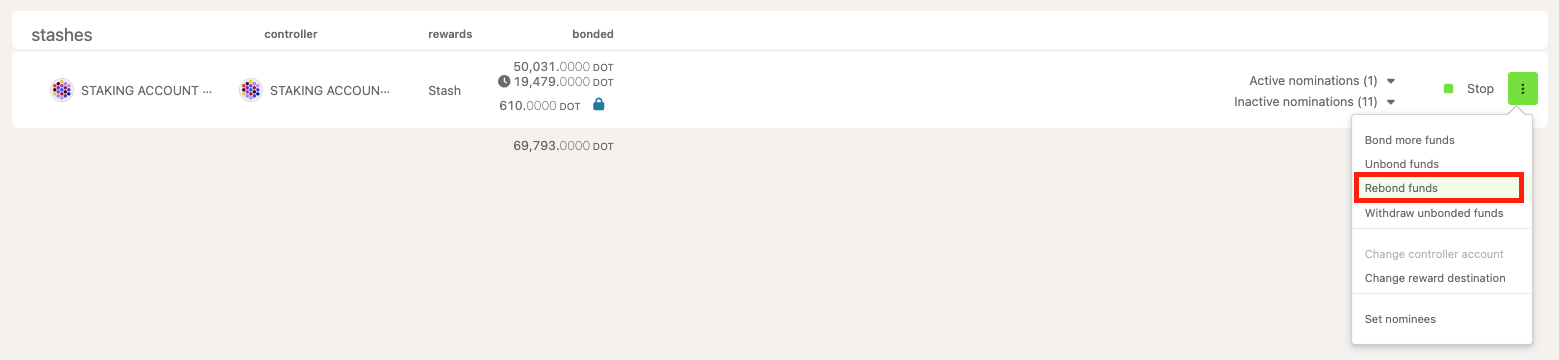
1. Click on the three dots on the right side of your account under the "Stashes" section.
2. Select "Rebond funds ":
 3. On the window that opens up, enter the amount you want to rebond or leave the pre-filled amount if you want to rebond the entire amount that's unbonding:
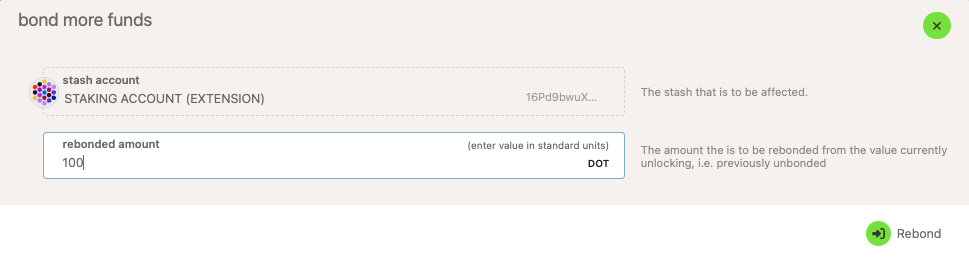
4. Then click "Rebond ," sign and submit the transaction. You have rebonded your DOT.